Personal Finance
Spending,
made quiet.
made quiet.
Kabu captures every transaction the moment it happens - automatically, silently, without interrupting your day.

Built from a personal frustration with expense tracking. I designed the product logic and daily loop, then used AI to build a working prototype over a long weekend.
I've tried a lot of budgeting apps. The issue is never the app — it's me. I'll use it for three or four days, then forget to log something on a busy afternoon, and that's it. The streak breaks and I stop opening the app.
Most budgeting tools ask for too much in the moment. You spend, open the app, type the amount, pick a category, save. Fine if you're at your desk. Not fine if you're tapping your phone at a hawker centre with a queue behind you.
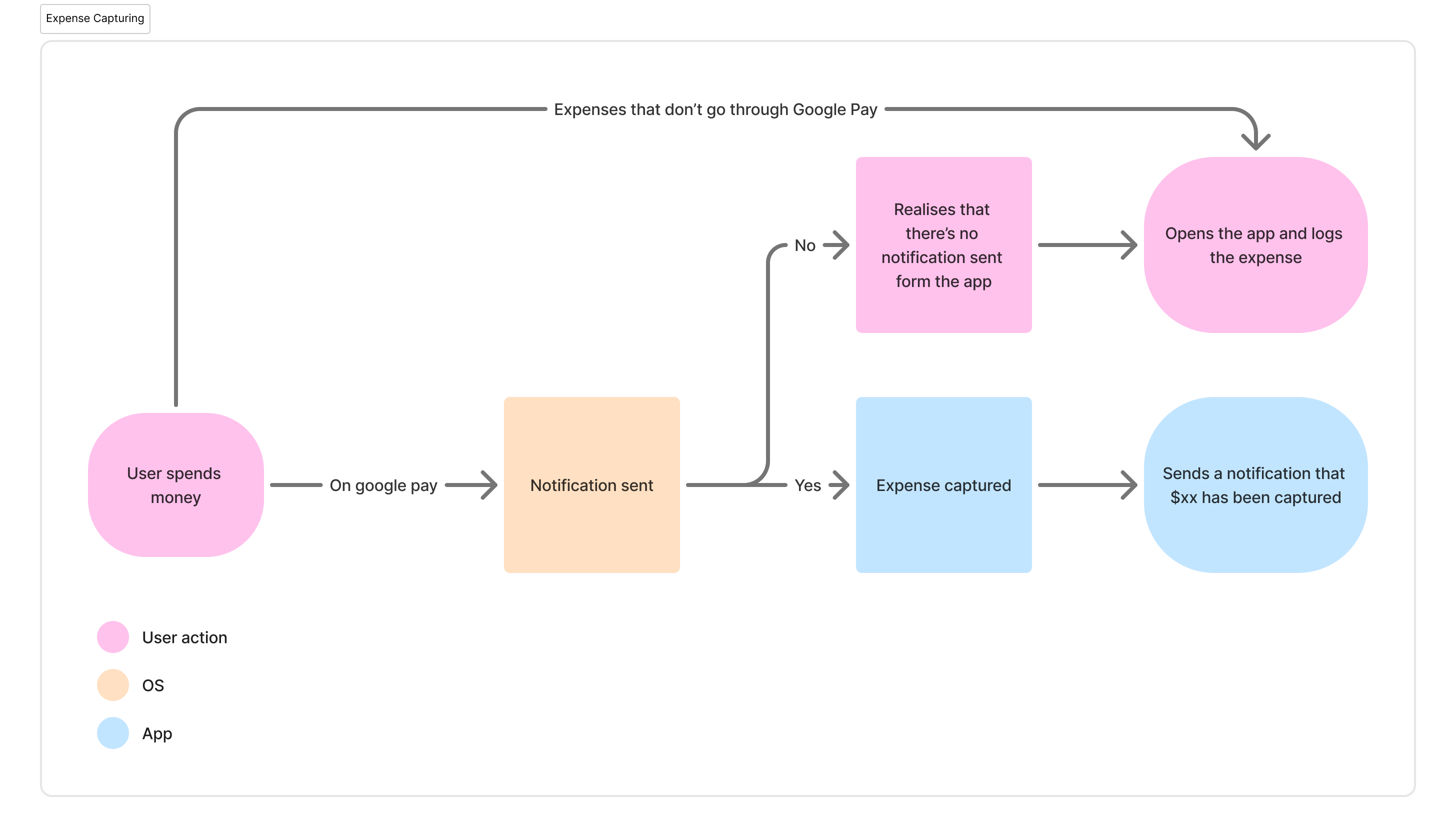
I already pay for everything with my phone. Every time I pay with Google Pay, it sends a notification with the merchant's name and the amount. That notification is already doing the work and I needed something to catch it.
I built an automation that listens for Google Pay notifications on my phone and pushes the transaction data straight into Kabu. I didn't need to open the app or type the amount I spent. It just showed up in my transaction list automatically.
For purchases that don't go through Google Pay (like cash payments, PayLah or PayNow), I made it such that logging was the simplest process ever. Logging the amount just meant typing the amount quickly before saving. But that's just the exception.
Google Wallet fires two notifications for every payment — a brief one and a detailed one. Both have the transaction amount. My automation caught both and logged the same purchase twice.
I tried throttling it with a time constraint. Three seconds between captures. Still doubled. One second. Still doubled. The notifications fire within milliseconds of each other, so timing was too blunt a fix.
The fix was from looking at my backend table that was capturing the data and displaying it on the app. It recorded any duplicate made within 30 seconds of each other won't get captured. This worked and filtered out the duplicate completely. While it was a small problem, it would have quietly broken the app's usefulness. If my daily total showed double what I'd actually spent, I'd stop trusting the numbers and stop checking.
Google Wallet fires two notifications for every payment. A brief one and a detailed one. Both have the transaction amount. My automation caught both and logged the same purchase twice.
I tried throttling it. Three seconds between captures. Still doubled. One second. Still doubled. Both notifications come in within milliseconds, so timing was too blunt a fix.
What worked was looking at the notification content. The detailed one includes the card name. The brief one doesn't. I set the automation to only capture notifications with my card name in them, and the duplicate went away. One payment, one entry.
Small thing, but it would've quietly broken the app. If my daily total showed double what I actually spent, I'd stop trusting it and stop checking.
Since the amount I spent logs automatically, I could focus more on handling where the money went. That's what tagging does.
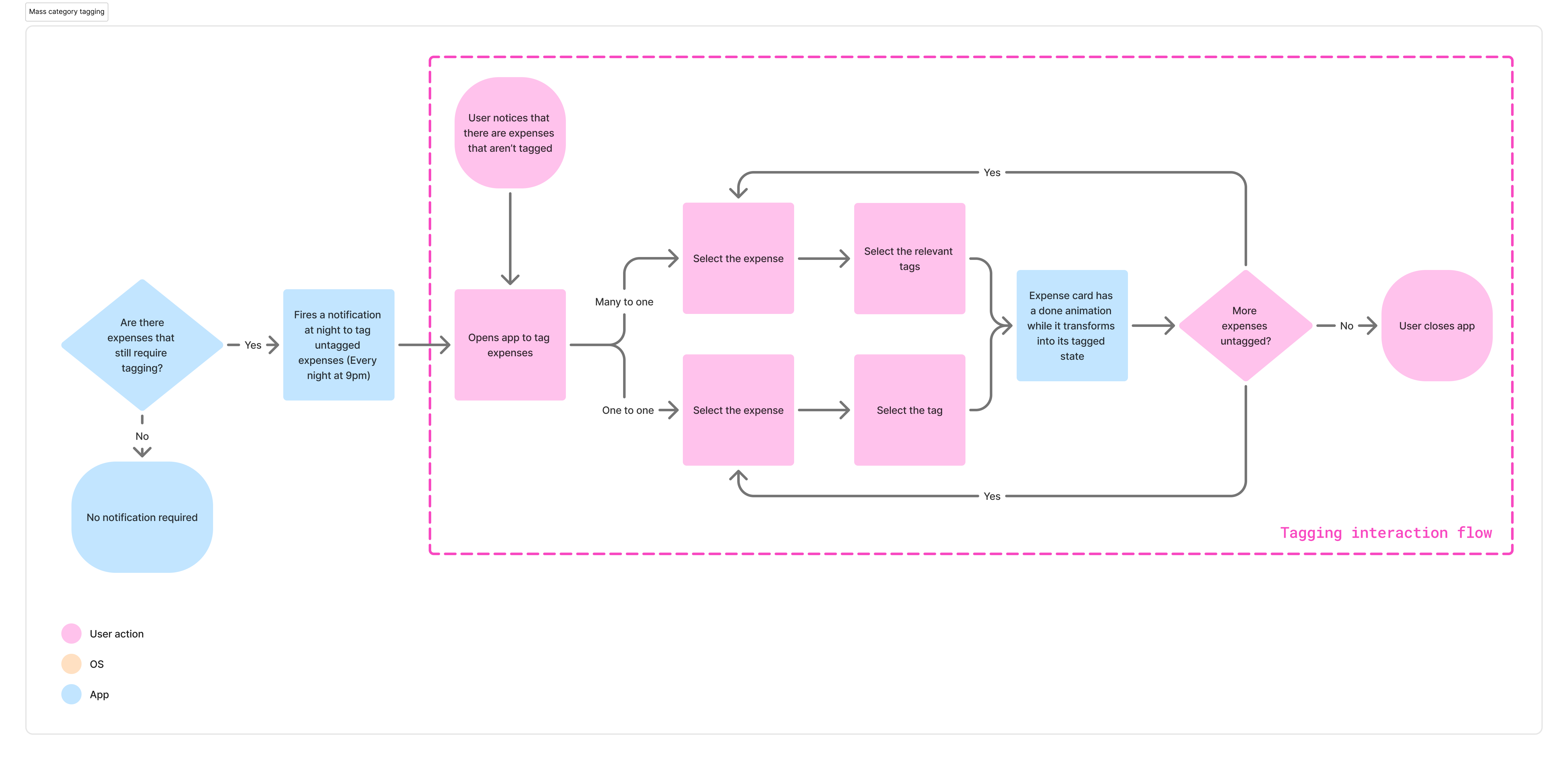
The app checks every night at 9pm whether there are untagged transactions. If there are, it sends a notification. I open the app, scroll through the day's expenses, and tag each one. Food, coffee, transport, or entertainment. These were categories that I have noticed in my day to day spending.
I designed two tagging modes. One-to-one lets you tap a single transaction and pick its category. Many-to-one lets you select multiple transactions and tag them all at once — useful when I've bought 2 cups of coffee for the day. Each tagged expense gets a subtle animation as it moves from the "needs tagging" pile to the "tagged" pile.
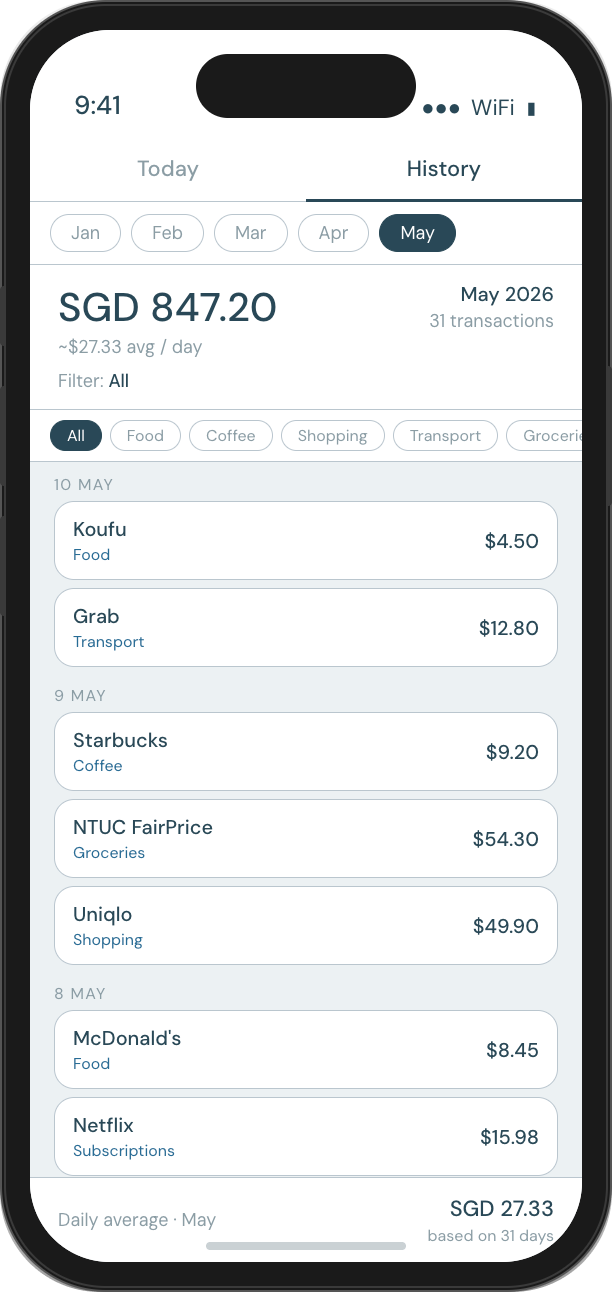
The tags feed into a history view that breaks down spending by category over time. That's the reason why I decided to build Kabu - I could start seeing patterns in where I was spending and do it in a way that I could be consistent with. I could start seeing patterns. Three Grab rides in one week or too many coffees.
One of the edge cases I had to design around was using public transport. While I use Google Pay, it doesn't capture the individual transaction amount that shows up. However, my credit card app would consolidate the amount I spend roughly every week.
One way I worked around this was a weekly reminder to log the consolidated transport amount. I would open my credit card app to view the consolidated amount and log it for the stated date. I can tag the amount for Transportation immediately when logging.

I had a list of things I could've added. Foreign currency conversion, recurring expenses, spending alerts, budget caps per category. All useful. None of them needed to be in the first version.
I scoped the MVP to the smallest thing that would actually work: auto-capture, manual fallback, tagging, and a history view. If the logging habit didn't stick, more features wouldn't save it. I needed to test the core loop first.
I designed the user journey, the notification triggers and the edge cases. Then I used Claude to build a working React app over a long weekend. I directed the UI but didn't design every screen from scratch. The point was to get something real into my hands as fast as possible.
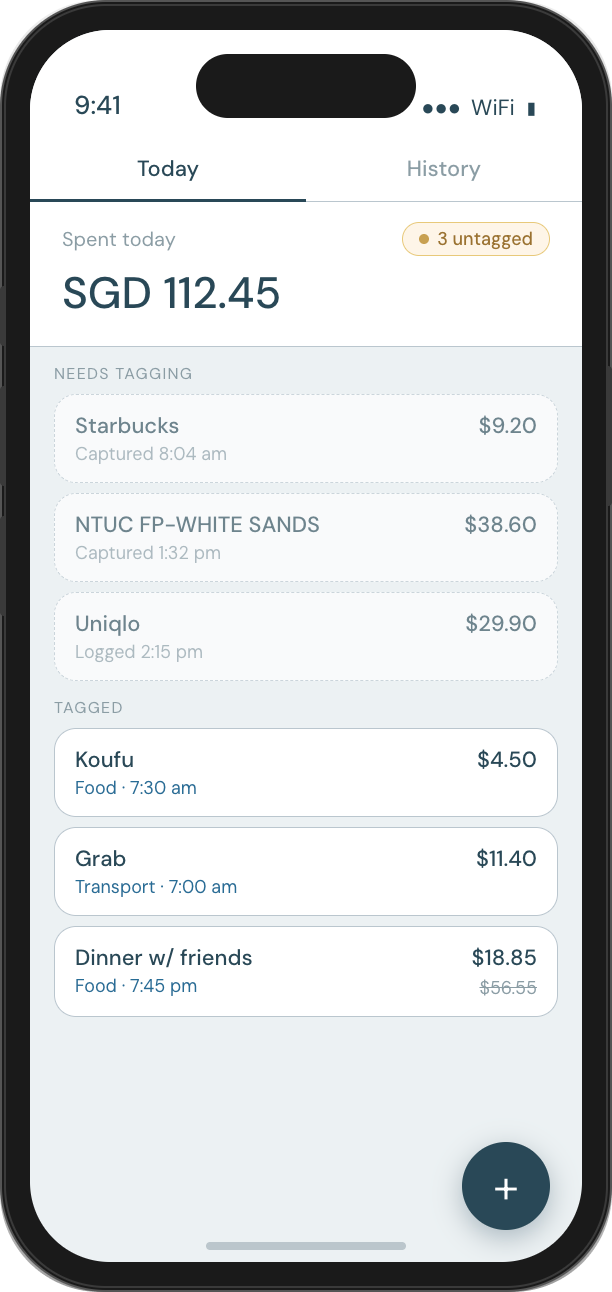
The app runs on my phone. I've been using it daily since I built it. The habit stuck because it shows up when necessary without intruding too much. I pay for something and move on. The app logs and keeps track of everything in the background.
The biggest lesson: the best way to keep a daily habit going is to remove the daily effort. I spent too long trying to make logging faster when I should have been asking whether it needed to be a manual action at all.
The duplicate notification bug taught me something about testing with real data. In a Figma prototype, "notification comes in and gets logged" is a single happy-path screen. In reality, two notifications come in and the whole system quietly breaks. Living with the tool exposed problems I never would have found otherwise. This gives me newfound respect for developers and QA people on a sprint team when they work on various test cases to ensure the product never breaks under pressure.